Give your resources predictable and standardized names based on the resource type, environment and region when deploying them to Azure instead of the default random names.
Table of contents
- Link to the code
- The problem
- What this code does
- How to use it
- System overview
- The InfrastructureResolver
- The default name resolver
- Resource-specific name resolvers (overrides)
- Putting it all together
- Final result
- Questions or feedback?
Link to the code
I'm only providing an overview of the system in this post. To see the full code and a sample app check out this repo on GitHub. It's part of a general nuget with some other utilities but the naming convention system is completely standalone and can be extracted from there.
The problem
When you define a resource in your Aspire app host you give it a name. This name will show up in the Aspire dashboard for that resource and it will also be the basis for its counterpart in Azure when deploying your code to the cloud. But Aspire doesn't give your cloud resource exactly the same name, it will often add a random identifier to it.
Given this name for a container environment resource:
builder.AddAzureContainerAppEnvironment("container-env");After running aspire publish the bicep deployment file for this resoure contains the following which equates to something like containerenvacrwup6kt2dn76fa:
resource container_env 'Microsoft.App/managedEnvironments@2025-01-01' = {
  name: take('containerenv${uniqueString(resourceGroup().id)}', 24)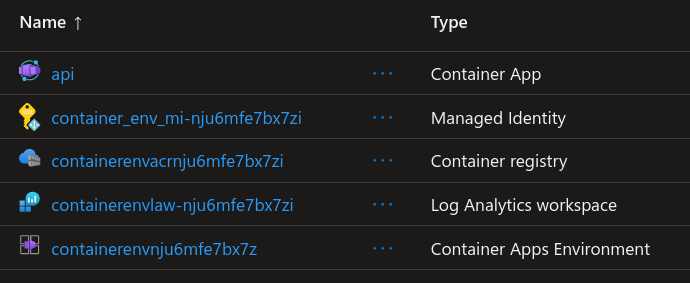
This might be okay for smaller projects or hobby setups but this becomes very cumbersome and unpredictable when say hosting a larger project with a lot of resources for a client that also probably entails several automation tasks and references to resource names. In these cases it's most likely your company has a naming policy or convention that the project and its resources must adhere to.
Azure also has documentation recommending a standardized naming convention along it's Cloud Adoption Framework guidelines.
What this code does
While there are ways of customizing your cloud resource names they either have to be done for each resource manually in the app host (via ConfigureInfrastructure callbacks) or centrally with a big switch clause on resource type often being the recommended solution.
But we can automatically generate a predictable cloud resource name for the resources defined in the app host. The default naming scheme looks like this: {resource prefix}-{project/client name}-{optional workload name}-{environment name}. The scheme is based on the above linked Azure documentation and also these resource abbreviations made for Azure specifically.
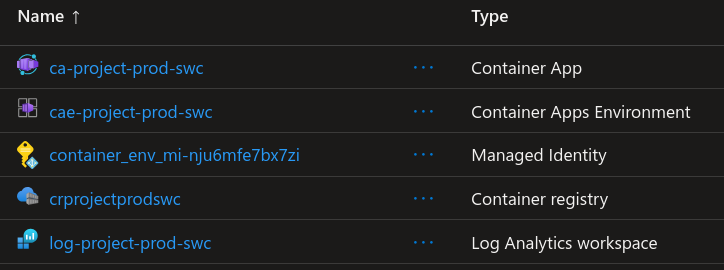
An example of this would be for a container app called "webapp": ca-projectname-webapp-prod-swc. The naming scheme is completely customizable for each individual type of resource.
Scroll down to the end to see the resources in the Azure portal with this naming scheme applied.
How to use it
The following code will produce a resource name like ca-projectname-webapp-prod-swc when publishing to Azure with environment name Production:
builder
    .WithAzureNamingConvention("projectname");

builder
    .WithProject<MyProject>("aspire-name")
    .WithAzureWorkloadName("webapp")
    .PublishAsAzureContainerApp((app, infra) =>
    {
        var ca = app.GetProvisionableResources().OfType<ContainerApp>().Single();
        ca.Location = AzureLocation.SwedenCentral;
    });

// alternative way:
builder
    .WithProject<MyProject>("aspire-name")

    // short-circuit the naming convention system and hard-code the Azure resource name directly
    .WithAzureWorkloadName("my-completely-custom-azure-name", overrideResourceName: true)

    // use the default region with Azure:Location in appsettings
    .PublishAsAzureContainerApp((app, infra) => {});
If the WithAzureWorkloadName is omitted, the resource name would be ca-projectname-prod-swc (without a specific workload name, useful for shared resources that only has 1 instance such as a key vault).
System overview
The key is the InfrastructureResolver class and how it's invoked for each resource being provisioned. By registering our own implementation we can set the name of the resource.
- Register a custom
InfrastructureResolver. - The
ResolvePropertiesmethod is called for each resource being provisioned. - Construct a context with information about the resource region, workload name, environment name and naming separator etc.
- Try and find a registered "name resolver" for this particular resource type. This is a custom class.
- Invoke the name resolver for the resource with the context, letting it join the segments accordingly with possible resource-specific overrides.
The InfrastructureResolver
Here's the gist of the custom infrastructure resolver:
public override void ResolveProperties(ProvisionableConstruct construct, ProvisioningBuildOptions options)
{
    // ...
    var nameResolver = GetResourceNameResolver(resource);

    if (nameResolver != null)
    {
        // set resource name with the resolver we found for this resource type
        SetResourceName(resource, nameResolver.ResolveName(resource, new NameResolutionContext
        {
            ProjectName = _projectName,
            AzureWorkloadName = workloadNameAssociation?.AzureWorkloadName,
            EnvironmentName = _environmentName,
            DefaultRegion = _defaultRegion,
            ResourceRegion = GetResourceLocation(resource),
            SupportsRegion = GetResourceLocationProperty(resource) != null,
            Separator = GetValidNameSeparator(nameRequirements),
            NameRequirements = nameRequirements
        }));

        return;
    }

    Console.WriteLine($"No name resolver found for {resource.GetType().Name}");
}
The default name resolver
A name resolver is a generic implementation, the type argument being the type of a specific provisionable Azure resource. The default resolver looks like this:
public virtual string ResolveName(T resource, NameResolutionContext context)
{
    var parts = new List<string?> {
        ResourcePrefixes.GetResourcePrefix(resource),
        context.ProjectName,
        context.AzureWorkloadName,
        _environmentNameResolver.ResolveEnvironmentName(context.EnvironmentName),
        context.SupportsRegion ?
            RegionNames.GetRegionName(context.ResourceRegion ?? context.DefaultRegion) :
            null
    };

    return string.Join(context.Separator, parts.Where(x => !string.IsNullOrWhiteSpace(x)));
}
Resource-specific name resolvers (overrides)
Certain resources have certain requirements. Here's the name resolver of an Azure SQL database resource that isn't bound to a region and therefore shouldn't include the region name in the resource name:
public class SqlDatabaseNameResolver : DefaultResourceNameResolver<SqlDatabase>
{
    public SqlDatabaseNameResolver(IEnvironmentNameResolver environmentNameResolver)
        : base(environmentNameResolver)
    {

    }

    public override string ResolveName(SqlDatabase resource, NameResolutionContext context)
    {
        // don't include region name in database name
        context.SupportsRegion = false;

        return base.ResolveName(resource, context);
    }
}
To include (or override) a custom resource name resolver simply register it with the service provider after calling WithAzureNamingConvention.
Putting it all together
Here's the code for the WithAzureNamingConvention extension that wires everything up:
public IDistributedApplicationBuilder WithAzureNamingConvention(string projectName)
{
    // environment name resolver
    builder.Services.AddSingleton<IEnvironmentNameResolver, DefaultEnvironmentNameResolver>();

    // register our default resource name resolvers for some resources
    builder.Services.AddSingleton<IResourceNameResolver<ContainerApp>, DefaultResourceNameResolver<ContainerApp>>();
    builder.Services.AddSingleton<IResourceNameResolver<KeyVaultService>, DefaultResourceNameResolver<KeyVaultService>>();
    builder.Services.AddSingleton<IResourceNameResolver<ContainerRegistryService>, DefaultResourceNameResolver<ContainerRegistryService>>();
    builder.Services.AddSingleton<IResourceNameResolver<OperationalInsightsWorkspace>, DefaultResourceNameResolver<OperationalInsightsWorkspace>>();
    builder.Services.AddSingleton<IResourceNameResolver<SqlServer>, DefaultResourceNameResolver<SqlServer>>();
    builder.Services.AddSingleton<IResourceNameResolver<StorageAccount>, DefaultResourceNameResolver<StorageAccount>>();

    // specific resource name resolver overrides
    builder.Services.AddSingleton<IResourceNameResolver<ContainerAppManagedEnvironment>, ContainerAppManagedEnvironmentNameResolver>();
    builder.Services.AddSingleton<IResourceNameResolver<SqlDatabase>, SqlDatabaseNameResolver>();

    // register our custom InfrastructureResolver
    builder.Services.Configure<AzureProvisioningOptions>(options =>
    {
        options
            .ProvisioningBuildOptions
            .InfrastructureResolvers
            .Insert(0, new NamingInfrastructureResolver(
                projectName,
                builder.Environment.EnvironmentName,
                GetDefaultLocationFromConfig(builder),
                builder.Services));
    });

    return builder;
}
Final result
And here's how our resources in Azure look now. Note the managed identity resource that was automatically created but that doesn't have a custom naming resolver registered to its resource type.
Questions or feedback?
Get in touch via GitHub.